
Practical advice
Contains affiliate links
How to use an outdoor security camera to film garden birds
Turn a weatherproof outdoor camera toward a feeder or bird bath with realistic focus, power, recording and privacy expectations.
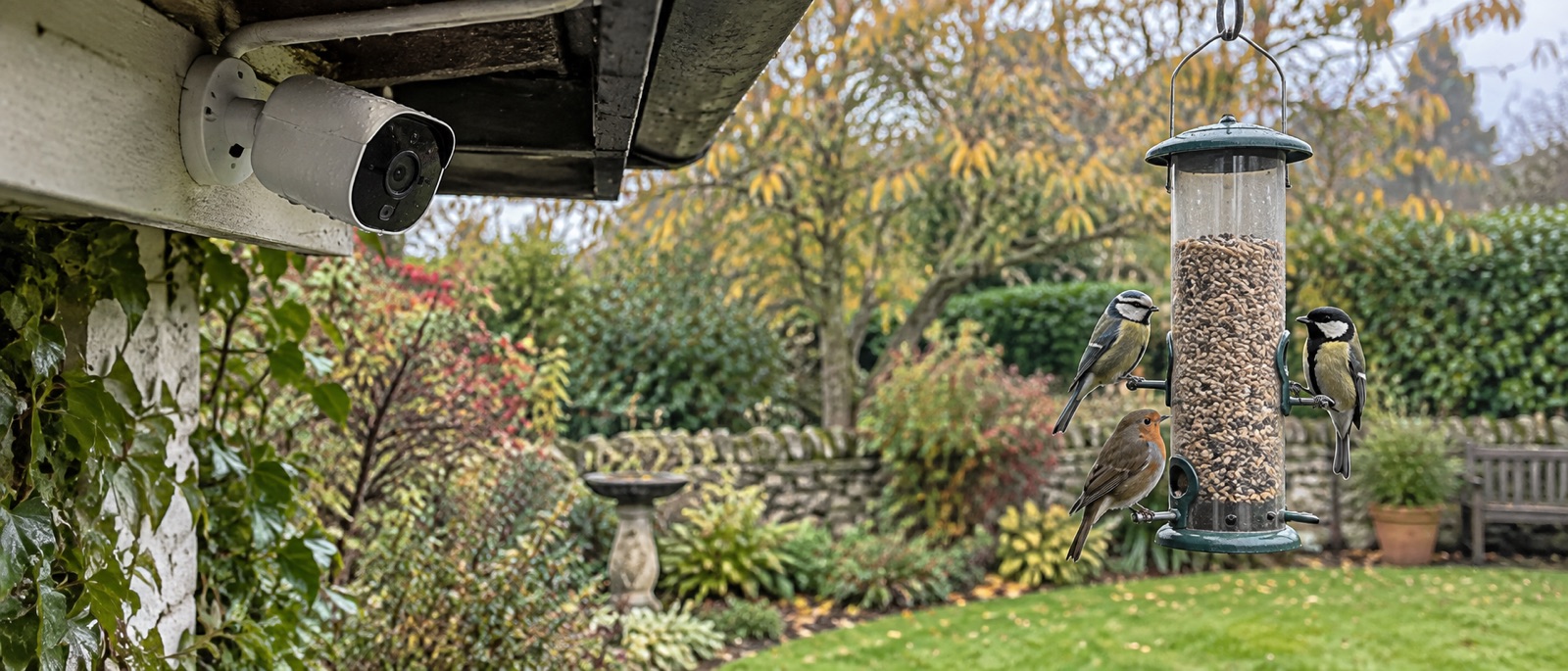
Test the actual feeder distance and saved image before fixing.
Keep alerts, sirens and lights from disturbing birds.
Treat privacy and cable protection as part of the installation.
Yes, you can use an outdoor security camera to film garden birds. Put a weatherproof camera where it has a clear, appropriately sized view of a feeder, bath or established route; check its actual focus and motion recording at that distance. Do not assume a security camera will produce the tight close-up of a purpose-built camera feeder. Its wider lens is often better for context and worse for feather detail.
Choose a scene before the device
A hanging feeder is predictable: birds pause in one place and can trigger motion detection. A bath may show more varied behaviour, but reflections can fool exposure. A garden path gives a broader wildlife view but smaller birds in the frame. Decide which trade-off you want before comparing resolution labels.
Stand where the camera will be mounted and take a phone photograph as a rough framing check. The security camera's lens may be wider, so use its own live preview before you drill. Make sure birds occupy enough of the picture to be recognisable without digital zoom. Move the camera closer if the maker's minimum focus distance permits; do not put it so close that a bird fills the sensor with blur.
| Scene | Likely strength | Likely limitation |
|---|---|---|
| Feeder at a fixed distance | Predictable motion and light | Small bird if camera is too far away |
| Bird bath | Natural drinking and bathing behaviour | Glare, moving water and exposure changes |
| Lawn or shrub edge | More species and behaviours | Small subjects and more false alerts |
The Tapo C320WS specification gives a 2K QHD image, 113-degree diagonal field of view, Wi-Fi or Ethernet networking and optional local microSD recording. Those are useful capabilities, not proof it will identify a wren from the far end of a garden. The included spotlight and siren are security features; turn them off for bird filming.
Put the camera in a bird-safe place
Mount the camera on sound timber or masonry, not a wobbling feeder pole unless a bracket is specifically rated and compatible. Keep mains adaptors and indoor-only connectors under suitable cover. Leave a downward drip loop before an entry point and protect cable from rain and garden tools. If a camera supports Wi-Fi and Ethernet, a safe wired network route can be more dependable than a marginal outdoor signal.
Position the feeder independently for bird safety: nearby escape cover, clear approach and reach for weekly cleaning. Then choose the camera viewpoint. Our camera-feeder positioning guide and feeding-station siting guide help prevent the lens from dictating a poor feeding spot.
Avoid pointing a security camera directly into a nest-box entrance at close range if its lights or movement would bother birds. Never put a general outdoor security camera inside a nest box; use a purpose-built short-focus unit installed before birds occupy the box.
Configure motion recording without chasing every leaf
Start with a small activity zone around the feeding or bathing area if the app supports zones. Lower motion sensitivity if swaying branches generate constant alerts, but keep a few saved test clips to ensure small birds still register. Disable people/vehicle alerts if they are irrelevant and do not let a siren or spotlight fire when a bird arrives. Review day and dusk footage; a night mode can illuminate other animals but does not make a daylight bird-feeding station useful after dark.
For a card-based setup, insert and format a supported microSD card in the app, then verify playback. For optional cloud clips, check the current retention and cost. SD card versus cloud storage explains the difference. A local card does not remove the need to protect the camera account.
Respect privacy and current feeding guidance
The ICO advises aiming a home camera away from neighbours' property and public areas where possible. A 113-degree security-camera view is far wider than a close feeder lens, so check the whole saved frame and use privacy masks if available. Follow our privacy and Wi-Fi security checklist before sharing clips.
The RSPB's current advice recommends seed and peanuts only from November through April, along with weekly cleaning and moving of feeders. The camera can stay pointed at the garden year-round, but the food routine should change with the season.
Frequently asked questions
Can I use a battery security camera for a continuous bird livestream?
Most battery cameras are designed for triggered clips, not uninterrupted broadcast. Check the exact model's live-stream and power specifications before planning one.
Will a 2K security camera show tiny birds clearly?
Only if the birds are large enough in the frame and the focus, light and shutter are suitable. Pixel count alone does not solve distance.
Can I turn off the security alarm features?
On models that allow it, do so near wildlife. Verify the setting with a test visit before leaving the camera unattended.
Helpful products
An outdoor camera suited to a wider feeder scene
This mains-powered model supports Wi-Fi or Ethernet and local microSD; it is not designed to sit inside a nest box or to focus inches from a perch.
TP-Link Tapo C320WS outdoor camera
A mains-powered IP66 outdoor camera with Wi-Fi or Ethernet networking, app live view and optional local microSD recording.
For a separately mounted camera watching a feeder at a suitable distance. Its wide security-camera field of view cannot promise close bird portraits; disable spotlight, siren and intrusive audio near wildlife and frame away from neighbours.