Practical advice
Contains affiliate links
How to livestream a garden bird feeder safely
Set up a reliable public garden-bird livestream using a camera with a supported local video feed, streaming software and privacy checks.
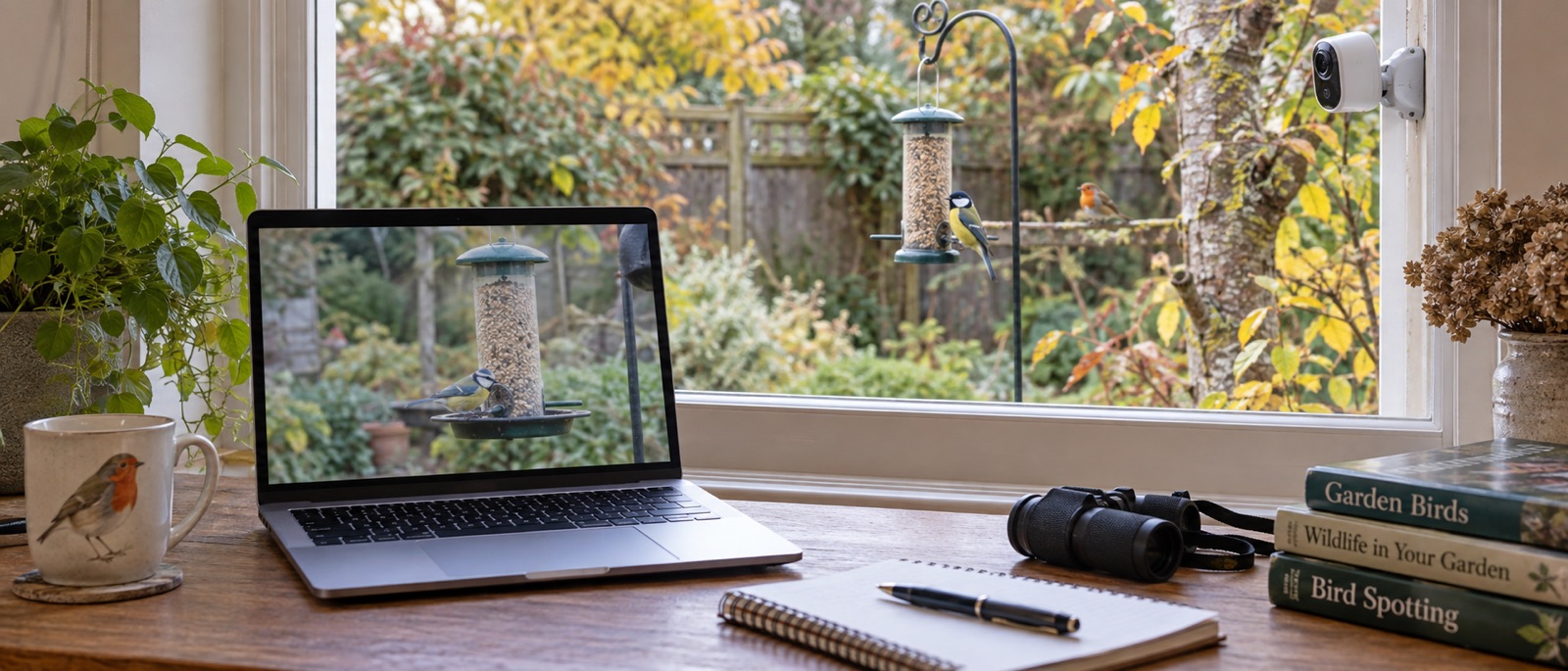
Confirm an RTSP or other supported output before buying.
Keep the computer, camera and network stable for the whole stream.
Check privacy, audio and bird-safe placement before going public.
To livestream a garden bird feeder publicly, you need more than a camera app that says “live”. Choose a camera with a documented video output that a computer can receive—RTSP is common—add it to streaming software such as OBS Studio, and send that software's output to your chosen platform. Set the camera where the food can be maintained safely, and check that the frame does not include neighbours before publishing.
First choose what “live” means
| Viewing goal | What you need | Typical limitation |
|---|---|---|
| Watch privately on your phone | Camera's own app and account | May not provide an exportable live video feed |
| Share short visits | App clip-download or sharing feature | Not a continuous public broadcast |
| Run a public feeder stream | Camera output such as RTSP, computer/encoder, platform account | Continuous power, upload bandwidth and moderation |
Birdbuddy and Birdfy make personal app viewing easy, but do not assume their consumer feeder apps provide an RTSP address or permission for third-party restreaming. Check the precise model and service terms. If public broadcasting is the goal from day one, a separately mounted outdoor camera with a documented output is usually the clearer route. Our outdoor-security-camera guide explains its framing limits.
A practical feeder-area setup
- Pick a bird-safe, reachable feeder location. Test the camera view at the intended distance and keep the whole frame inside your property if possible.
- Confirm that the exact camera and hardware version support an RTSP or another output your streaming software can receive. TP-Link documents RTSP/ONVIF support for supported wired Tapo models, including C320WS; check the current UK firmware and maker's steps.
- Connect the camera to a stable network and power supply. Ethernet avoids a weak garden Wi-Fi link if a safe cable route is available. Do not expose a router port to the open internet just to reach RTSP.
- Add the local video feed to OBS Studio as a media/network source following the camera maker's instructions. Keep any URL containing credentials private. Watch the preview for several minutes before sending it anywhere.
- Enable live streaming on your platform account and confirm its current eligibility rules. YouTube can require account verification and an activation wait; do this before your planned broadcast, not at the last minute.
- Enter the platform's stream key privately in OBS, run an unlisted test, then check the stream from a second device. Watch the saved test for audio, neighbouring property, dropped frames and unwanted lights.
This is a basic route, not a promise that every camera and platform combination is plug-and-play. Green Feathers publishes an RTSP-to-OBS guide for its compatible Wi-Fi and wired IP bird-box cameras. A bird-box stream is different from a feeder stream: install and test it only when the box is empty, then do not open an occupied box to rescue the broadcast.
Keep the stream bird-friendly
Do not move a feeder into a poor location just to fill the frame. A suitable spot has stable access for weekly cleaning, safe escape cover and no cat ambush point. Disable a security camera's siren and bright spotlight; turn off two-way talk near birds. The RSPB's 2026 feeding advice limits seed and peanuts to 1 November–30 April and calls for regular hygiene. A continuous stream can still show a bath or natural garden visits outside that food season.
Use a wired or mains-powered camera if you want a long session. Many battery smart feeders wake for short visits and may not be designed for continuous output. Keep a simple backup plan: if the computer, internet or camera fails, stop the stream gracefully rather than leaving an unattended camera in a risky position.
Privacy, security and moderation before public release
The ICO's home CCTV guidance recommends pointing away from other properties and public areas. A public stream deserves a stricter check than a private clip. Mask neighbouring windows and shared paths, avoid capturing conversations and identify any house numbers or people that appear at different times of day. Our camera privacy checklist covers account passwords, firmware and who can watch.
Never show your RTSP credentials or platform stream key in a screen recording. Use the platform's moderation settings if chat is enabled. Know how to end the stream immediately if it unexpectedly shows a person or a sensitive area. Public streaming of an active nest may raise additional welfare and legal issues; it never authorises touching or adjusting the occupied box.
Frequently asked questions
Can I livestream directly from a Birdbuddy or Birdfy app?
Personal live viewing and app sharing are not the same as a supported public video output. Confirm the exact model's official broadcast options before making that the core plan.
Does an SD card help a livestream?
It can provide a local recording on a compatible camera, but it does not itself send live video to a platform. See SD card versus cloud.
Can I leave the stream running all night?
Only if the camera, power, network, platform and privacy setup support continuous operation. For a daytime feeding station, an overnight stream is usually unnecessary; avoid lights that disturb wildlife.
Helpful products
Cameras with documented computer-stream routes
The Tapo is an outdoor feeder-area camera; the Green Feathers PoE example is for a bird box fitted while empty before the nesting season, not a feeder tray. Choose the scene first.
TP-Link Tapo C320WS outdoor camera
A mains-powered IP66 outdoor camera with Wi-Fi or Ethernet networking, app live view and optional local microSD recording.
For a separately mounted camera watching a feeder at a suitable distance. Its wide security-camera field of view cannot promise close bird portraits; disable spotlight, siren and intrusive audio near wildlife and frame away from neighbours.
Green Feathers HD PoE bird-box camera with 20m cable
A wired network camera that carries power and data over Ethernet, supplied with a twenty-metre cable.
Best stable network connection. Drawback: PoE is more technical and needs compatible network hardware.